


Create Multiple Columns for Various Data Types from a Single Column - Power Query
The source data includes multiple transactions where the date, product, and quantity are combined into a single column, but their order varies for each transaction.
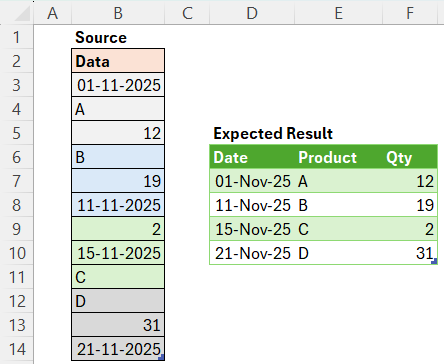
Our objective is to create three separate columns: Date, Product, and Quantity.
Method-1:
let
Source = Excel.CurrentWorkbook(){[Name="Table1"]}[Content],
Result = Table.FromRows(List.Transform(List.Split(Source[Data],3), (x) => [L = List.Sort(x), fin = {L{0},L{2},L{1}}][fin]), {"Date","Product","Qty"})
in
Result
Method-2:
let
Source = Excel.CurrentWorkbook(){[Name="Table1"]}[Content],
Result = Table.FromColumns(List.Transform( {type datetime, type text, type number}, (x) => List.Select(Source[Data], each Type.Is(Value.Type(_),x))),{"Date","Product","Qty"})
in
Result

Comments