


Reverse a Range of Text Values - Excel:
We have a range of cells containing text strings, and the objective is to reverse each of those text values.
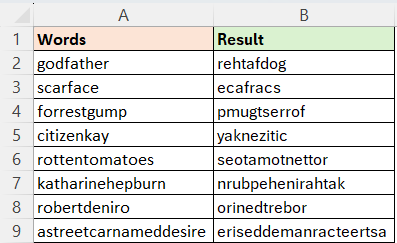
Workbook Link:
Excel:
Method-1:
=BYROW(MID(A2:A9,99-SEQUENCE(,99)+1,1),CONCAT)
Method-2:
=REDUCE("",SEQUENCE(99),LAMBDA(a,v,MID(A2:A9,v,1)&a))
Power Query:
let
Source = Excel.CurrentWorkbook(){[Name="Table1"]}[Content],
Result = Table.AddColumn(Source,"Result", (f) => Text.Reverse(f[Words]))
in
Result
Python in Excel:
df = xl("A1:A9", headers=True)
df['Result'] = df['Words'].apply( lambda x: x[::-1])
df


Comments