


Numerous Methods to Extract Text Before Nth Delimiter from the End
The source table contains values separated by commas in a single column.
The objective is to extract the text preceding the 2nd delimiter from the end.
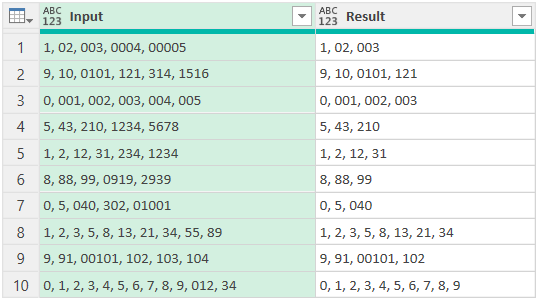
Excel:
Method-1:
=TEXTBEFORE(B3:B12,", ",-2)
Method-2:
=MAP(B3:B12,LAMBDA(x,ARRAYTOTEXT(DROP(TEXTSPLIT(x,,", "),-2))))
Method-3:
=MID(B3:B12,1,FIND("|",SUBSTITUTE(B3:B12,",","|",LEN(B3:B12)-LEN(SUBSTITUTE(B3:B12,",",))-1))-1)
Power Query:
Method-4:
let
Source = Excel.CurrentWorkbook(){[Name="Table1"]}[Content],
Result = Table.AddColumn(Source,"Result", each Text.BeforeDelimiter([Input],", ",{1,RelativePosition.FromEnd}))
in
Result
Note that RelativePosition.FromEnd can be replaced with 1.
Method-5:
let
Source = Excel.CurrentWorkbook(){[Name="Table1"]}[Content],
Result = Table.AddColumn(Source,"Result", each Text.Combine(List.RemoveLastN(Text.Split([Input],", "),2),", "))
in
Result
Python:
Method-6:
df = xl("B2:B12",1)
df["Result"] = [i.rsplit(", ",2)[0] for i in df["Input"]]
df
Method-7:
df = xl("B2:B12",1)
df["Result"] = df["Input"].apply(lambda x: ", ".join(x.split(", ")[:-2]))
df
Method-8:
L = xl("B3:B12")[0]
res = [i.rsplit(", ",2)[0] for i in L]
res
Method-9:
L = xl("B3:B12")[0]
res = [', '.join(i.split(", ")[:-2]) for i in L]
res

Comments